1. Go to Settings icon.
2. Press Mail, Contacts, Calendars icon
3. Press IBM Lots Notes Traveler icon.
4. Press Account icon.
5. Fill in your new password
6. Done.
Showing posts with label Lotus Notes Traveler. Show all posts
Showing posts with label Lotus Notes Traveler. Show all posts
Wednesday, January 26, 2011

Thursday, December 2, 2010
iPhone : Cannot Get Mail The Connection to server failed
when I go into the inbox I get "Cannot Get Mail, The Connection to the server failed". I can send email and do look ups to the address book. On the server its shows me "Connected" with ActiveSync and as far as security No policy with Allow access. I am the only user on the server with this issue.
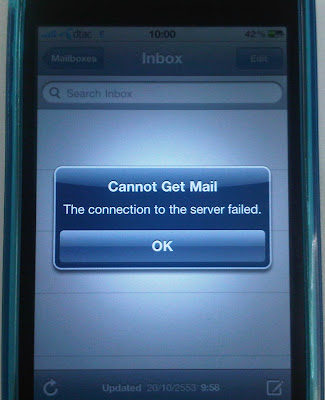

Finally a Solution. Just restart the Lotus Notes Traveler server and run this command "tell traveler reset * UserName"
Wednesday, October 20, 2010
iPhone : Removing A Lotus Notes Traveler Account From Your iPad, iPhone, or iPod Touch
Removing A Lotus Notes Traveler Account From Your iPad, iPhone, or iPod Touch
1.Click the SETTINGS icon.
2.Click the GENERAL icon.
3.Scroll down to the PROFILE setting and select “IBM LOTUS NOTES TRAVELER.”
4.Click on the REMOVE button.
5.At the warning prompt, press the REMOVE button. Enter your password if you have one on your device.
1.Click the SETTINGS icon.
2.Click the GENERAL icon.
3.Scroll down to the PROFILE setting and select “IBM LOTUS NOTES TRAVELER.”
4.Click on the REMOVE button.
5.At the warning prompt, press the REMOVE button. Enter your password if you have one on your device.
Subscribe to:
Posts (Atom)