Showing posts with label Excel. Show all posts

Wednesday, November 10, 2010

Excel 2010 : Cannot see Oracle Add-Ins on Microsoft Excel 2010

Excel 2010 : Cannot see Oracle Add-Ins on Microsoft Excel 2010

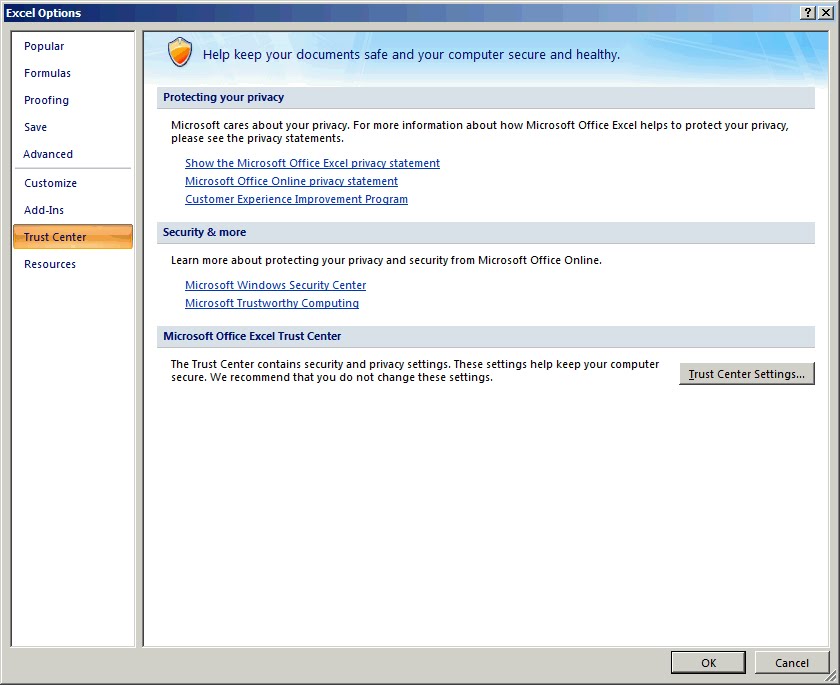
1. Go to File menu, and then click Options.
Excel 2010 : Cannot see Oracle Add-Ins on Microsoft Excel 2010


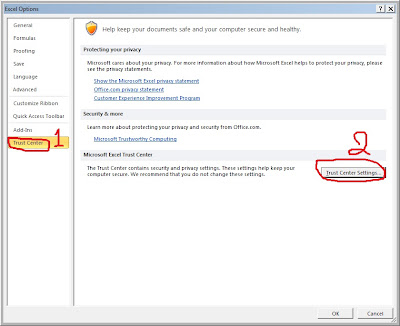
2. In the Excel Options dialog window, go to Trust Center and click Trust Center Settings.
Excel 2010 : Cannot see Oracle Add-Ins on Microsoft Excel 2010

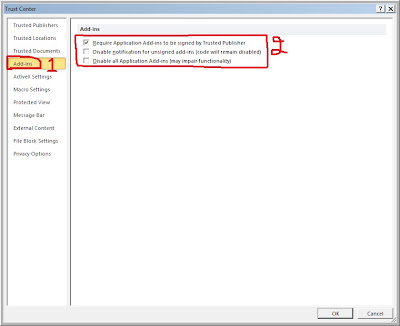
3. Click Add-Ins, and then select the function same the picture below
Excel 2010 : Cannot see Oracle Add-Ins on Microsoft Excel 2010

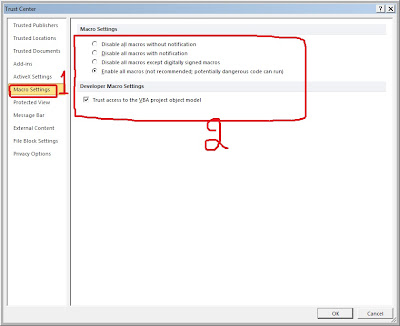
4. Click Macro Settings, and then select the function same the picture below
Excel 2010 : Cannot see Oracle Add-Ins on Microsoft Excel 2010

4. click OK.

Saturday, October 30, 2010

Excel 2010 : Disable Protected View In Microsoft Office 2010

1. Go to file menu, and then click Options.

Excel 2010 : Disable Protected View In Microsoft Office 2010
2. In the Excel Options dialog window, go to Trust Center and click Trust Center Settings.

Excel 2010 : Disable Protected View In Microsoft Office 2010
3. In the Trust Center dialog window, and then uncheck the options whatever you want.

Excel 2010 : Disable Protected View In Microsoft Office 2010 4. when done, click OK


Saturday, August 28, 2010

Error : Print titles must be contiguous and complete rows or columns

When you click Print Preview or Print button and you get this message

"Print titles must be contiguous and complete rows or columns "

solving this error :
in excel 2007 chose Page Layout - > Printe Titles -> Tap Sheet : see below Cell errors as : chose blank . ok.


When you click Print Preview or Print and get this message

Saturday, June 12, 2010

Excel : How do I set enable macro in microsoft excel?

1. Click Start ,Excel Options.

Excel : How do I set enable macro in microsoft excel?


2. choose Trust Center and Trust Center Settings.

Excel : How do I set enable macro in microsoft excel?

3. In menu Macro Settings check box in Enable all macro
Excel : How do I set enable macro in microsoft excel?